

🔧 Overview
The TU141AL BIOS package is designed for multiple laptop models, including Acer Aspire 3 A325-51, Acer Aspire 3 AL14-51M-37GM, and Gateway GWTC71427-BK. This package contains tested BIOS firmware dumps for different revisions (Rev 3, Rev 2.1A, Rev 1.1) with both 16MB and 32MB sizes.
This multi-version BIOS collection is highly useful for technicians dealing with BIOS corruption, no display, dead boot, or firmware-related issues.
💻 Supported Models & Versions
This BIOS package supports the following:
- Acer Aspire 3 A325-51 BIOS
- Acer Aspire 3 AL14-51M-37GM BIOS
- Gateway GWTC71427-BK BIOS
👉 All files are matched according to motherboard revision and BIOS size.
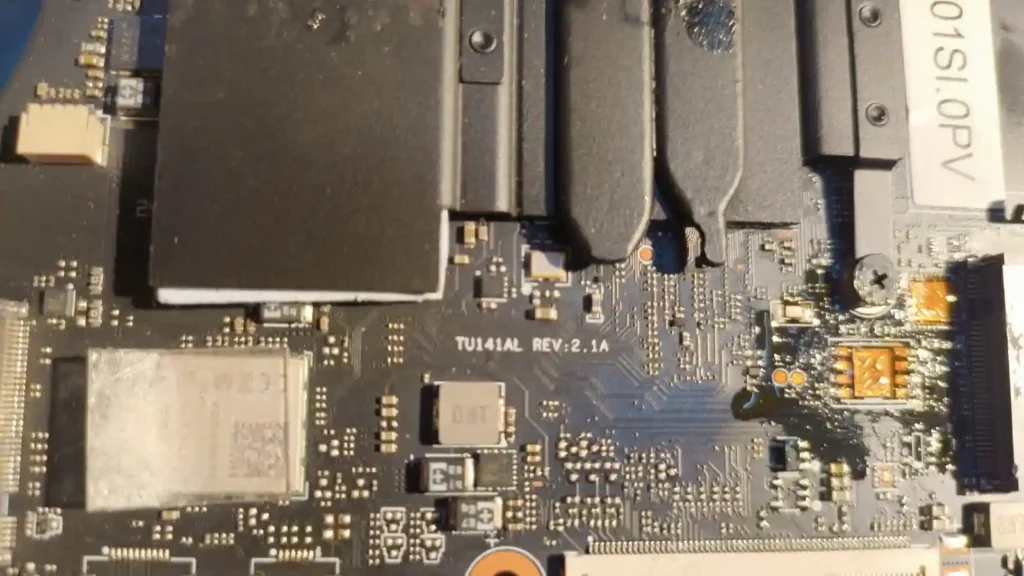
| Parameter | Details |
|---|---|
| Motherboard | TU141AL / TU140AL |
| Laptop Model / Series | Acer Aspire 3 / Gateway |
| Main BIOS Size | 32 mb / 16 mb (as per Rev please check ) |
| EC Controller | – |
| EC BIOS | – |
| Tested | Tested OK bios |
🔄 Update BIOS from Official Acer Support (For Working Laptops)
If your Acer laptop is powering on normally and working properly, it is recommended to update the BIOS using the official Acer support website.
Acer provides the latest BIOS updates based on your exact device using the Serial Number (S/N) or SNID, ensuring correct compatibility and system stability.
👉 Visit Acer official support page:
https://www.acer.com/in-en/support/drivers-and-manuals
Steps to follow:
- Enter your Acer device Serial Number (S/N) or SNID
- Select your exact laptop model
- Download the latest BIOS or driver updates
- Follow Acer’s official update instructions carefully
⚠️ Note: Official BIOS updates are safer for working systems. The BIOS files provided on this page are mainly intended for repair purposes such as BIOS corruption, no display, or boot failure.
🛠️ Problems This BIOS Can Fix
Technicians can use this TU141AL BIOS firmware to resolve:
- No display issue
- Laptop stuck at logo
- BIOS corruption
- Boot failure
- Restart loop
- Firmware crash after update
🔍 Why Multiple BIOS Versions Matter
Different motherboard revisions require specific BIOS files. Using the wrong version may result in:
- System not booting
- Display failure
- Hardware mismatch issues
👉 Always match:
- Board name (TU141AL / TU140AL)
- Revision (Rev 3 / 2.1 / 1.1)
- BIOS size (16MB / 32MB)
📥 Download Instructions
- Login required to download files
- Choose BIOS according to your motherboard version
- Recommended for professional repair technicians
🧠 Motherboard Insight
The TU141AL / TU140AL motherboard platform is used in Acer and Gateway laptops. It integrates:
- CPU and chipset controller
- Memory interface
- Graphics support
- Power management circuits
The BIOS firmware stored in SPI flash is responsible for initializing hardware and controlling system boot.
If corrupted, the laptop may fail to start or show abnormal behavior.
⚡ Flashing Guide (Quick Steps)
- Disconnect battery and power
- Locate BIOS chip
- Backup original firmware
- Flash correct BIOS version
- Verify and reassemble
- Test system
⚠️ Important Notes
- Always verify board TU141AL / TU140AL
- Match correct revision before flashing
- Keep backup of original BIOS
- Use proper SPI programmer
⚠️ Important Disclaimer
⚠️ Not a technical person?
If you are not a trained technician, please do not attempt to flash the BIOS of your Acer Aspire 3 or Gateway laptop (TU141AL / TU140AL motherboard platform) without proper knowledge and tools. Incorrect BIOS flashing can permanently damage the motherboard.
BIOS programming requires chip-level repair expertise and professional diagnostic tools.
If you need professional help, you can visit our laptop repair service network:
👉 https://ezonecare.com/ (Search your city)
📍 New Delhi → Acer Laptop Repair in New Delhi
📍 Ranchi → Acer Laptop Repair in Ranchi
📍 Chandrapur → Acer Laptop Repair in Chandrapur
Our technicians specialize in BIOS flashing, motherboard repair, firmware recovery, and chip-level diagnostics.
Disclaimer
These BIOS files are provided for educational and professional repair purposes only. Flashing incorrect firmware may damage the motherboard.