

Tested OK BIOS dump for LA-9104P motherboard used in Dell Inspiron 3521 laptop.
The package includes Main BIOS, EC BIOS, and KBC file, professionally verified and Clean ME region confirmed.
If your Dell Inspiron 3521 is experiencing no display, stuck on Dell logo, BIOS corruption, auto restart, or firmware-related boot problems, this BIOS file set may help restore proper system operation.
LA-9104P BIOS Free Download
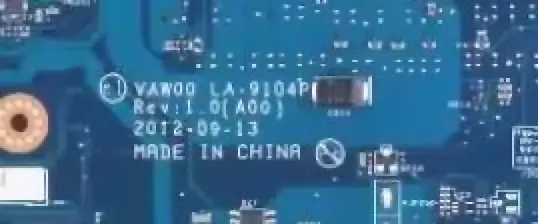
| Parameter | Details |
|---|---|
| Motherboard | LA-9104P Rev:1 |
| Laptop Model / Series | DELL INSPIRON 3521 |
| Main BIOS Size | 4mb |
| KBC Controller | KB9012 |
| EC BIOS | 2mb |
| Tested | Yes Clean Me Tested |
📦 BIOS Package Information
- Main BIOS – 8MB
- EC BIOS – Included
- KBC firmware file included
- Clean Intel ME Region
- Boot stability verified
- No BIOS password lock
- Suitable for firmware corruption repair
🔄 Update BIOS from Official Dell Support (For Working Laptops)
If your Dell laptop is powering on normally and working without major issues, it is recommended to update the BIOS using the official Dell support website.
Dell provides the latest BIOS updates based on your exact laptop configuration using the Service Tag, ensuring proper compatibility and system stability.
👉 Visit Dell official support page:
https://www.dell.com/support/home/en-in?app=drivers
Steps to follow:
- Enter your Dell laptop Service Tag or model number
- Open the Drivers & Downloads section
- Download the latest BIOS version available
- Follow Dell’s official update instructions carefully
⚠️ Note: Official BIOS updates are always safer for working systems. The BIOS files provided on this page are intended for repair purposes such as BIOS corruption, no display, or boot failure.
⚠ When To Flash This BIOS
Flash only in the following cases:
- Power on but no display
- System stuck at Dell logo
- BIOS corrupted
- Automatic restart loop
- No boot after BIOS update
- EC firmware damaged
Do not flash if motherboard has hardware short circuit, charging IC fault, CPU issue, or power rail problem.
🛠 Flashing Instructions (Professional Use Only)
- Identify BIOS chip (8MB SPI flash).
- Identify EC/KBC chip before programming.
- Take complete backup of original BIOS and EC.
- Confirm motherboard printed code LA-9104P.
- Program using professional SPI programmer
- Verify write after programming.
- Clear CMOS after flashing.
- First boot may take slightly longer.
🔎 Important Notes
- Always confirm the exact motherboard revision before flashing.
- Do not use on a different board number.
- Service tag may require manual update.
- Match EC controller model before writing EC firmware.
- Use professional programming tools only.
📌 Disclaimer
These BIOS files are provided strictly for educational and professional repair purposes only.
Flashing BIOS involves technical risk. Proceed only if you have proper knowledge and professional equipment.
We are not responsible for any damage caused by incorrect flashing, wrong file selection, or improper programming procedure.
All brand names, logos, and motherboard images used on this website are the property of their respective companies. They are used here strictly for identification and educational reference purposes only.