

This post provides the tested 8MB BIOS dump for NM-C821 motherboard used in Lenovo IdeaPad 3-17ADA05 series (GS450 / GS550 / GS750 variants).
The BIOS file has been carefully verified for stable boot performance and firmware integrity. It is suitable for professional repair use in cases of BIOS corruption or boot-related issues.
If your IdeaPad 3-17ADA05 has no display, stuck on logo, automatic restart, or firmware corruption problem, this BIOS file may help restore normal functionality.
NM-C821 BIOS Free Download
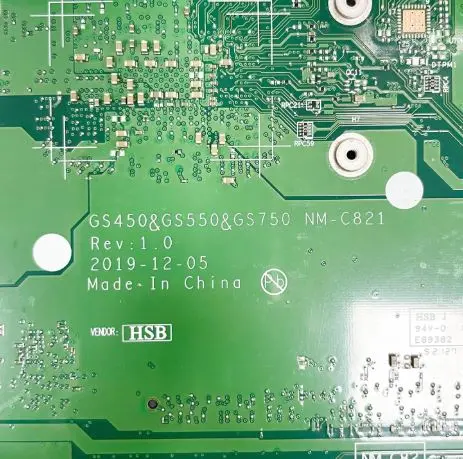
| Parameter | Details |
|---|---|
| Motherboard | NM-C821 GS450/GS550&GS750 |
| Laptop Model / Series | IdeaPad 3-17ADA05 |
| Main BIOS Size | 8mb |
| EC Controller | – |
| EC BIOS | – |
| Tested | Yes Tested |
📦 BIOS Package Information
- Main BIOS – 8MB
- Clean firmware structure
- Boot tested for stability
- No supervisor password lock
- Suitable for corrupted BIOS repair
- Compatible with GS450 / GS550 / GS750 board revisions
⚠ When To Flash This BIOS
Flash only in the following situations:
- Power on but no display
- Laptop stuck at Lenovo logo
- BIOS corruption
- Continuous restart loop
- No boot after failed BIOS update
- Firmware damaged
Do not flash if motherboard has hardware short, CPU issue, RAM slot fault, or power rail problem.
🛠 Flashing Instructions (Professional Use Only)
- Locate 8MB SPI BIOS chip on motherboard.
- Take full backup of original BIOS before writing.
- Confirm motherboard printed code NM-C821.
- Match board variant (GS450 / GS550 / GS750).
- Program using SPI programmer
- Verify write after programming.
- Clear CMOS after flashing.
- First boot may take slightly longer than usual.
🔎 Important Notes
- Always confirm exact motherboard number before use.
- Do not use on different NM series board.
- Serial number / MTM may require manual correction after flashing.
- EC file not included in this package.
- Use professional programming tools only.
📌 Disclaimer
These BIOS files are provided strictly for educational and professional repair purposes only.
Flashing BIOS involves technical risk. Proceed only if you have proper knowledge and professional equipment.
We are not responsible for any damage caused by incorrect flashing, wrong file selection, or improper programming procedure.
All brand names, logos, and motherboard images used on this website are the property of their respective companies. They are used here strictly for identification and educational reference purposes only.
⚠️ Not a technical person?
If you are not a trained technician, please do not attempt to flash the BIOS of your Lenovo IdeaPad 3-17ADA05 (NM-C821 motherboard) without proper knowledge, tools, and programming equipment. Incorrect BIOS flashing may damage the motherboard and prevent the laptop from starting.
BIOS programming requires chip-level repair experience, SPI programmers, and proper diagnostic tools. If you are unsure about the process, it is always safer to seek help from a qualified laptop repair technician.
You can visit one of our professional repair service centers, where experienced technicians perform BIOS programming and motherboard repairs using professional equipment.
📍 New Delhi → Laptop Repair in New Delhi
https://ezonecare.com/new-delhi/
📍 Ranchi → Laptop Repair in Ranchi
https://ezonecare.com/ranchi/
📍 Chandrapur → Laptop Repair in Chandrapur
https://ezonecare.com/chandrapur/
Our technicians handle chip-level laptop repair, BIOS flashing, motherboard diagnostics, and firmware recovery using advanced repair tools and industry-standard procedures.