

The LA-M783P BIOS firmware is designed for the HP OMEN 16 gaming laptop motherboard platform. This BIOS package contains the 16MB tested firmware dump with Clean ME region, which is commonly required for motherboard-level diagnostics and firmware repair.
If the laptop experiences issues such as BIOS corruption, no display, boot failure, or system stuck at the HP logo, flashing a verified BIOS dump can restore normal system operation. The firmware provided here is tested and verified, making it suitable for professional technicians performing chip-level laptop repairs.
About HP OMEN 16 Gaming Series
The HP OMEN 16 series is a high-performance gaming laptop lineup designed for gamers and power users who require strong CPU and GPU performance. These laptops feature advanced cooling systems, high refresh rate displays, and powerful processors to support demanding gaming workloads.
Because OMEN gaming laptops are widely used worldwide including India, the United States, and Europe, technicians frequently require BIOS firmware files when troubleshooting motherboard firmware problems or repairing systems affected by BIOS corruption.
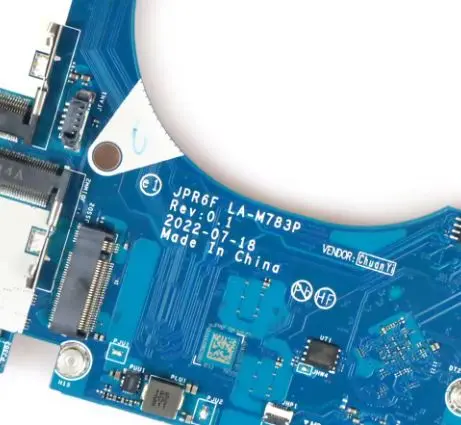
| Parameter | Details |
|---|---|
| Motherboard | LA-M783P |
| Laptop Model / Series | HP OMEN 16 Gaming |
| Main BIOS Size | 16mb |
| EC Controller | – |
| EC BIOS | – |
| Tested | Yes Clean Me Tested |
BIOS Download
Login is required to download the BIOS package. Registered users can access the tested BIOS firmware dump for professional motherboard repair and firmware recovery.
🔄 Update BIOS from Official HP Support (For Working Laptops)
If your HP laptop is powering on normally and the system is functioning properly, it is always recommended to update the BIOS using the official HP support website.
HP provides the latest BIOS updates based on your exact laptop model, ensuring compatibility and system stability.
👉 You can download the official BIOS update from HP here:
https://support.hp.com/us-en/drivers/laptops
Before updating, make sure to:
- Enter your correct HP laptop model number
- Download the latest BIOS version available
- Follow HP’s official update instructions carefully
⚠️ Note: Official BIOS updates are safer for working systems. The BIOS files provided on this page are mainly intended for repair purposes such as BIOS corruption, no display, or boot failure.
BIOS Package Information
- Main BIOS firmware dump – 16MB
- Clean ME region
- Verified working BIOS
- Stable boot tested
- Suitable for BIOS corruption repair
- Compatible with SPI programmers
About the LA-M783P Motherboard
The LA-M783P motherboard platform is used in the HP OMEN 16 gaming laptop series. This motherboard integrates the processor platform, chipset controller, memory architecture, graphics interface, and power management circuitry required for gaming laptop operation.
The firmware controlling the system is stored inside a SPI flash BIOS chip, which initializes hardware components and manages the system boot process. If the BIOS firmware becomes corrupted due to interrupted updates, firmware errors, or electrical faults, the laptop may fail to start correctly.
Reprogramming the BIOS using a clean and verified firmware dump can help restore motherboard functionality and allow the system to boot normally again.
When to Flash This BIOS
Technicians may need to flash this BIOS in the following situations:
- Laptop powers on but no display
- System stuck at HP logo
- BIOS corruption
- Laptop not booting properly
- Automatic restart loop
- Firmware failure after BIOS update
Flashing Instructions
- Disconnect the laptop battery and power adapter.
- Locate the SPI BIOS chip on the LA-M783P motherboard.
- Use an SPI programmer such as CH341A, RT809H, or TL866.
- Backup the original BIOS firmware before flashing.
- Load the BIOS dump file into the programming software.
- Write the firmware to the SPI flash chip.
- Verify the programming process.
- Reassemble the laptop and test system boot.
Important Notes
- Confirm the motherboard model LA-M783P before flashing.
- Always backup the original BIOS firmware before programming.
- Use reliable SPI programming tools.
- BIOS flashing should only be performed by experienced technicians.
⚠️ Important Disclaimer
⚠️ Not a technical person?
If you are not a trained technician, please do not attempt to flash the BIOS of your HP OMEN 16 gaming laptop (LA-M783P motherboard) without proper knowledge and programming tools. Incorrect BIOS flashing can permanently damage the motherboard and prevent the laptop from starting.
BIOS programming requires chip-level repair skills, SPI programmers, and proper diagnostic equipment.
If you are unsure about the procedure, it is recommended to visit a professional repair center where experienced technicians can safely perform BIOS repair.
📍 New Delhi → Laptop Repair in New Delhi
https://ezonecare.com/new-delhi/
📍 Ranchi → Laptop Repair in Ranchi
https://ezonecare.com/ranchi/
📍 Chandrapur → Laptop Repair in Chandrapur
https://ezonecare.com/chandrapur/
If you need professional help for BIOS repair, you can visit our laptop repair service network where experienced technicians handle motherboard diagnostics, BIOS programming, and chip-level repairs.
You can search for your nearest service location by visiting our official website:
https://ezonecare.com/
From there, you can easily find repair centers in your city and contact a qualified technician for safe BIOS repair.
Our technicians specialize in chip-level laptop repair, BIOS programming, motherboard diagnostics, and firmware recovery using professional tools and advanced repair equipment.
Disclaimer
The BIOS files provided on this website are intended for educational and professional motherboard repair purposes only. Flashing BIOS firmware carries risk and should only be performed by qualified technicians. The website is not responsible for damage caused by improper firmware flashing.