

This page provides tested Acer Swift 3 SF316-51 main BIOS and EC firmware for the GH4UT LA-L151P Bios motherboard . Always back up the original BIOS and EC firmware before flashing and, if possible, test on a separate chip first.
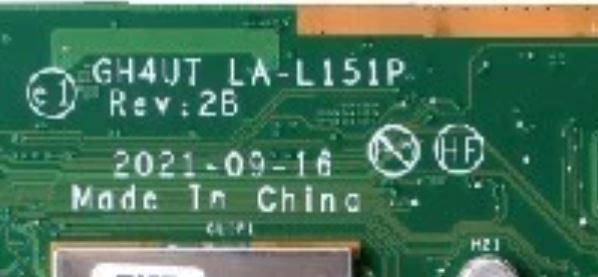
| Parameter | Details |
|---|---|
| Motherboard | GH4UT LA-L151P |
| Laptop Model / Series | Acer Swift 3 SF316-51 |
| Main BIOS Size | 16 mb |
| EC Controller | – |
| EC BIOS | Yes |
| Tested | Yes |
🔄 Update BIOS from Official Acer Support (For Working Laptops)
If your Acer laptop is powering on normally and working properly, it is recommended to update the BIOS using the official Acer support website.
Acer provides the latest BIOS updates based on your exact device using the Serial Number (S/N) or SNID, ensuring correct compatibility and system stability.
👉 Visit Acer official support page:
https://www.acer.com/in-en/support/drivers-and-manuals
Steps to follow:
- Enter your Acer device Serial Number (S/N) or SNID
- Select your exact laptop model
- Download the latest BIOS or driver updates
- Follow Acer’s official update instructions carefully
⚠️ Note: Official BIOS updates are safer for working systems. The BIOS files provided on this page are mainly intended for repair purposes such as BIOS corruption, no display, or boot failure.
Disclaimer:
These BIOS and EC firmware files are provided for educational and professional repair purposes only. Flashing BIOS or EC firmware involves risk. Proceed only if you have proper technical knowledge.