

Dell Inspiron 3521 LA-9104P BIOS, EC BIOS, Boardview Clean ME Tested OK
Introduction
The Dell Inspiron 3521 LA-9104P BIOS firmware package includes the main BIOS dump, EC BIOS firmware, and motherboard boardview file. These files are useful for repairing firmware-related problems such as BIOS corruption, no display, boot failure, or system stuck at the Dell logo screen.
This BIOS dump is Clean ME and tested OK, making it suitable for professional laptop repair technicians performing motherboard-level diagnostics and firmware programming. The repair files are commonly used by technicians and repair labs across India, USA, and international service centers.
About Dell Inspiron 3521 Series
The Dell Inspiron 3521 is part of Dell’s consumer laptop lineup designed for everyday computing. These laptops are commonly used by students, home users, and office professionals due to their reliable performance and affordable price.
The Inspiron 3521 platform supports Intel processors and provides stable performance for daily tasks such as web browsing, office applications, and multimedia usage. Because these laptops are widely used around the world, BIOS firmware and boardview files are often required by technicians when repairing motherboard firmware issues.
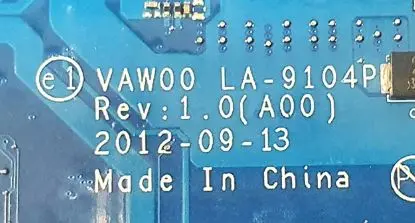
| Parameter | Details |
|---|---|
| Motherboard | LA-9104P |
| Laptop Model / Series | Dell Inspiron 3521 |
| Main BIOS Size | 4mb |
| Processor Platform | Intel Platform |
| EC BIOS | 2mb |
| Tested | Yes Clean me |
BIOS Download
Login is required to download the firmware package. Registered users can download the BIOS dump, EC BIOS firmware, and boardview files for professional repair and diagnostic purposes.
BIOS Package Information
- Main BIOS firmware file
- Embedded Controller (EC) BIOS
- Clean ME Region
- Motherboard boardview file
- Verified working firmware dump
- Stable boot tested
- Suitable for BIOS corruption repair
- Compatible with SPI programmers
🔄 Update BIOS from Official Dell Support (For Working Laptops)
If your Dell laptop is powering on normally and working without major issues, it is recommended to update the BIOS using the official Dell support website.
Dell provides the latest BIOS updates based on your exact laptop configuration using the Service Tag, ensuring proper compatibility and system stability.
👉 Visit Dell official support page:
https://www.dell.com/support/home/en-in?app=drivers
Steps to follow:
- Enter your Dell laptop Service Tag or model number
- Open the Drivers & Downloads section
- Download the latest BIOS version available
- Follow Dell’s official update instructions carefully
⚠️ Note: Official BIOS updates are always safer for working systems. The BIOS files provided on this page are intended for repair purposes such as BIOS corruption, no display, or boot failure.
About the LA-9104P Motherboard
The LA-9104P motherboard is used in the Dell Inspiron 3521 laptop platform. This motherboard integrates the processor platform, chipset controller, memory slots, graphics interface, and power management circuits required for system operation.
The firmware system consists of the main BIOS firmware and the Embedded Controller (EC) firmware. The BIOS manages hardware initialization and system boot processes, while the EC firmware controls keyboard functions, thermal management, and battery charging.
If the firmware becomes corrupted due to interrupted BIOS updates or electrical faults, the laptop may fail to start properly. Reprogramming the BIOS and EC firmware using a verified dump file can restore normal functionality.
When to Flash This BIOS
Technicians may need to flash BIOS or EC firmware in the following cases:
- Laptop powers on but no display
- System stuck at Dell logo
- BIOS corruption
- Laptop not booting
- Automatic restart loop
- Firmware problems after BIOS update
Flashing Instructions
- Disconnect the laptop battery and power adapter.
- Locate the SPI BIOS chip on the motherboard.
- Use an SPI programmer such as CH341A, RT809H, or TL866.
- Backup the original BIOS firmware before flashing.
- Load the BIOS dump file into the programmer software.
- Write the BIOS file to the SPI flash chip.
- If required, program the EC BIOS firmware separately.
- Verify the programming process and reassemble the laptop.
Important Notes
- Confirm the motherboard model LA-9104P before flashing.
- Always backup the original BIOS firmware.
- Use reliable SPI programming tools.
- BIOS flashing should only be performed by experienced technicians.
Frequently Asked Questions
Q: Which laptop uses the LA-9104P motherboard?
A: The Dell Inspiron 3521 laptop uses the LA-9104P motherboard platform.
Q: What files are included in this package?
A: The package includes BIOS dump, EC BIOS firmware, Clean ME region, and motherboard boardview file.
Q: When should this BIOS be flashed?
A: Flash this BIOS when the laptop experiences BIOS corruption, no display issues, or boot failures.
Disclaimer
The firmware files provided on this website are intended for educational and professional laptop repair purposes only. Flashing BIOS or EC firmware involves risks and should be performed only by qualified technicians. Improper flashing may damage the motherboard.