

🔧 Overview
The LA-J551P BIOS package is designed for the Lenovo IdeaPad 5-14IIL05 laptop, based on the FLMS0 motherboard platform. This package includes a tested BIOS dump, EC BIOS firmware, and boardview file, making it a complete toolkit for motherboard-level repair.
This firmware set is commonly used to fix issues like BIOS corruption, no display, system not booting, or unstable power behavior.
💻 Supported Device & Platform
This firmware supports:
- Lenovo IdeaPad 5-14IIL05 BIOS
- Motherboard: LA-J551P
- Board Code: FLMS0
- Platform: Intel-based architecture
This model is widely used in USA, UK, and global markets, especially for productivity and office work.
📦 Package Contents
- ✔ LA-J551P BIOS (tested dump)
- ✔ Lenovo EC BIOS firmware
- ✔ LA-J551P boardview file
- ✔ Stable and verified firmware
👉 BIOS + EC + Boardview combination helps technicians diagnose and repair complex issues.
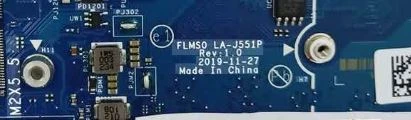
| Parameter | Details |
|---|---|
| Motherboard | FLMS0 LA-J551P |
| Laptop Model / Series | IdeaPad 5-14IIL05 |
| Main BIOS Size | 16 mb |
| EC Controller | KB9052 |
| EC BIOS | 128kb |
| Tested | Yes Tested and |
🛠️ Issues This BIOS Can Fix
Technicians use this LA-J551P BIOS to repair:
- No display / black screen
- Laptop stuck on Lenovo logo
- BIOS corruption
- Boot failure
- Restart loop
- Power or keyboard issues (EC BIOS related)
🔍 Role of EC BIOS
The EC BIOS (Embedded Controller firmware) is responsible for:
- Keyboard and touchpad control
- Fan speed and thermal management
- Battery charging system
- Power sequencing
If EC firmware is corrupted, the laptop may:
- Turn on but not boot
- Show unusual fan behavior
- Fail to respond properly
📥 Download Instructions
- Login required to download
- Access BIOS + EC BIOS + Boardview
- Recommended for professional repair technicians
🧠 Motherboard Architecture Insight
The LA-J551P motherboard (FLMS0 platform) integrates:
- Intel processor and chipset
- RAM controller
- Graphics interface
- Power management ICs
The system depends on both:
- Main BIOS firmware
- EC firmware
If either firmware fails, the system may not start or behave abnormally.
⚡ Flashing Steps (Simplified)
- Disconnect battery and charger
- Locate BIOS & EC chips
- Backup original firmware
- Flash LA-J551P BIOS
- Flash EC BIOS if needed
- Verify and reassemble
⚠️ Important Notes
- Always verify motherboard LA-J551P
- Keep backup before flashing
- Use proper SPI programmer
- Avoid partial or incorrect flashing
⚠️ Important Disclaimer
⚠️ Not a technical person?
If you are not a trained technician, please do not attempt to flash the BIOS of your Lenovo IdeaPad 5-14IIL05 (FLMS0 LA-J551P motherboard) without proper knowledge and tools. Incorrect BIOS or EC flashing can permanently damage the motherboard.
BIOS and EC programming require chip-level repair expertise, SPI programmers, and professional diagnostic tools.
If you need professional help for BIOS repair, you can visit our laptop repair service network:
👉 https://ezonecare.com/ (Search your city)
📍 New Delhi → Laptop Repair in New Delhi
https://ezonecare.com/new-delhi/
📍 Ranchi → Laptop Repair in Ranchi
https://ezonecare.com/ranchi/
📍 Chandrapur → Laptop Repair in Chandrapur
https://ezonecare.com/chandrapur/
Our technicians specialize in BIOS flashing, EC firmware programming, motherboard diagnostics, and chip-level laptop repair.
Disclaimer
This firmware is provided for educational and professional repair purposes only. Improper flashing may damage the motherboard.