

🔧 Overview
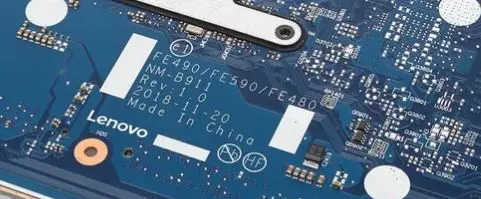
The NM-B911 BIOS firmware is designed for the Lenovo ThinkPad E590 business-class laptop, supporting models Type 20NB and 20NC. This BIOS package includes a Clean ME tested firmware dump, widely used by technicians for resolving firmware-related motherboard issues.
This BIOS is particularly useful when dealing with no display, BIOS corruption, boot failure, or system freezing during startup. The file is tested and suitable for professional repair environments.
💼 About ThinkPad E590 Series
The Lenovo ThinkPad E590 is a business-oriented laptop built for reliability, long-term performance, and enterprise use. It is commonly used across:
- Corporate offices
- Educational institutions
- Professional work environments
Because of its strong presence in markets like the United States, United Kingdom, Canada, and Europe, BIOS repair demand for this model is quite common in service centers.
📦 What You Get
- ✔ NM-B911 BIOS (Clean ME)
- ✔ Tested working firmware dump
- ✔ Stable system initialization
- ✔ Suitable for professional repair
| Parameter | Details |
|---|---|
| Motherboard | NM-B911 |
| Laptop Model / Series | ThinkPad E590 |
| Main BIOS Size | 16 MB |
| EC Controller | – |
| EC BIOS | – |
| Tested | Yes tested OkBios |
🛠️ Common Faults Resolved
Technicians use this NM-B911 BIOS to repair:
- No display issue
- System stuck on Lenovo logo
- BIOS corruption
- Boot loop problem
- System not powering properly
- Firmware failure after update
🔍 About Clean ME BIOS
The Clean ME region ensures proper Intel Management Engine initialization, which helps in:
- Stable boot process
- Improved system communication
- Fixing hidden firmware errors
This is especially important in business laptops like ThinkPad series.
📥 Download Instructions
To download the BIOS file:
- Login required
- Access tested firmware dump
- Recommended for professional technicians
🧠 Motherboard & Firmware Insight
The NM-B911 motherboard platform is built for Intel-based ThinkPad systems and integrates:
- CPU & chipset controller
- Memory interface
- Power management circuits
- Embedded system firmware
The BIOS stored in SPI flash memory is responsible for:
- Hardware initialization
- Boot process
- System stability
If corrupted, the system may fail to start or behave abnormally. Reprogramming the BIOS using a verified dump can restore proper functionality.
⚡ Flashing Process (Quick Steps)
- Disconnect battery and AC adapter
- Locate SPI BIOS chip
- Backup original firmware
- Load NM-B911 BIOS file
- Flash using SPI programmer
- Verify and reassemble
⚠️ Important Notes
- Always verify motherboard NM-B911
- Backup original BIOS before flashing
- Use reliable tools like CH341A / RT809H
- Perform flashing only if experienced
⚠️ Important Disclaimer
⚠️ Not a technical person?
If you are not a trained technician, please do not attempt to flash the BIOS of your Lenovo ThinkPad E590 (NM-B911 motherboard, Type 20NB / 20NC) without proper knowledge and tools. Incorrect BIOS flashing can permanently damage the motherboard.
BIOS programming requires chip-level repair expertise and professional diagnostic tools.
If you need professional help, you can visit our laptop repair service network where experienced technicians handle BIOS programming and motherboard diagnostics.
You can search for your nearest service center here:
https://ezonecare.com/
Find service locations in your city:
📍 New Delhi → Laptop Repair in New Delhi
https://ezonecare.com/new-delhi/
📍 Ranchi → Laptop Repair in Ranchi
https://ezonecare.com/ranchi/
📍 Chandrapur → Laptop Repair in Chandrapur
https://ezonecare.com/chandrapur/
Our technicians specialize in BIOS flashing, firmware recovery, motherboard repair, and chip-level diagnostics.
Disclaimer
This BIOS file is provided for educational and professional repair purposes only. Improper flashing may damage the motherboard.